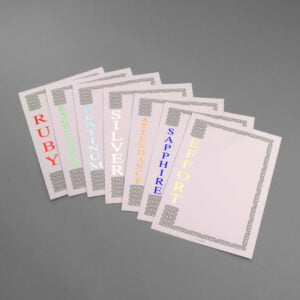
Create your own certificates with A4 Victoria-style certificate paper. Each pack contains 100 sheets of 175gsm parchment board with a foil-blocked border. Use the Victoria template to add your establishment name, logo, award and recipient details. Check your printer’s instructions for the supported paper weight and finish before printing.
Explore our range of printer-friendly Parchment Certificates. If you have any questions or queries, then please don’t hesitate to contact us.
How to Print on A4 Certificate Paper
Use the Victoria-style template to prepare your certificate wording. Add your establishment name, logo, award and recipient details, then remove the grey border guide before printing.
Check your printer’s instructions for the paper weight and finish it supports. Print a trial on plain A4 paper to check the wording and alignment before using your certificate stock.
We’ve created a template to make overprinting onto our A4 Victoria Style Certificates quicker and simpler. Click here to download the template.
Follow these instruction to overprint your certificates:
1. Download and save template.
2. Click on greyed out border design and delete.
3. Copy and paste your school logo onto template.
4. Replace ‘Establishment Name’ with wording of your choice and ‘Award’ with more detail if desired.
5. Save and print if handwriting certificates or insert recipient name, date and so on if printing.
What size and weight is the certificate paper?
This is A4 Victoria-style certificate paper made from 175gsm parchment board with a foil-blocked border. Each pack contains 100 sheets for adding your own certificate wording.
Can I customise the parchment colour and border?
Yes, you can choose from parchment colours such as Blue, Grey, Dark Cream, and Light Cream, and border colours including Bronze, Silver, Gold, and Platinum.
Can I print my own wording on this certificate paper?
Use the downloadable Victoria template to add your establishment name, logo, award and recipient details. Check your printer’s instructions for the supported paper weight and finish, then print a trial on plain A4 paper to check the layout before using your certificate stock.
How do I use the certificate template?
Download and save the template, remove the grey border guide and add your wording. Check the layout with a plain-paper trial before printing your certificates.
Related Items
Custom Printed Ring Binders
View Product
This product has multiple variants. The options may be chosen on the product page
Award Certificates – A5 George Style (Pack of 100)
Select options
This product has multiple variants. The options may be chosen on the product page
School Standard Files
View Product
This product has multiple variants. The options may be chosen on the product page